A web scraping program to extract data from the website https://toscrape.com/ and save the scraped data into a file.
Key Features
✔ Scrapes structured data from the target website ✔ Extracts information such as titles, prices, ratings, and reviews ✔ Handles pagination to retrieve data from multiple pages ✔ Stores data in various formats (CSV, JSON, or database) ✔ Uses Python and BeautifulSoup/Scrapy for efficient extraction
Technology Stack
🟢 Python – Primary programming language 🟢 BeautifulSoup / Scrapy – HTML parsing and data extraction 🟢 Requests – Fetching website content 🟢 Pandas – Data structuring and storage 🟢 CSV/JSON – Exporting scraped data
How It Works
1️⃣ Sends an HTTP request to the target website and retrieves the HTML content 2️⃣ Parses the HTML using BeautifulSoup or Scrapy to extract relevant data 3️⃣ Navigates through multiple pages (if necessary) to collect complete datasets 4️⃣ Cleans and structures the extracted data 5️⃣ Saves the data into a CSV or JSON file for further use
Output & Use Cases
📂 The extracted data can be used for data analysis, price tracking, sentiment analysis, or machine learning applications.
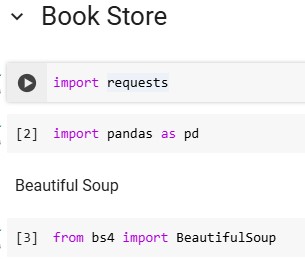
1️⃣ Importing Required Libraries
✔ requests – Fetches the HTML content from the website ✔ pandas – Stores and processes scraped data ✔ BeautifulSoup – Parses and extracts data from the HTML
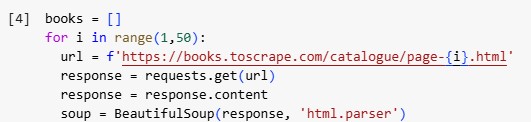
2️⃣ Initializing Web Scraping Loop
✔ This code loops through 50 pages of the website, fetching HTML content from each page.
3️⃣ Extracting Book Data
✔ Finds the section where all books are listed ✔ Extracts all book containers (each book is an <article> tag with class product_pod)
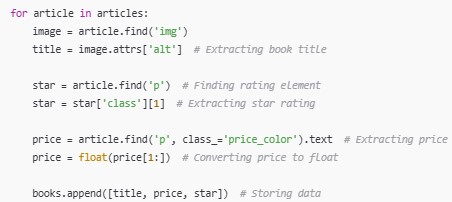
4️⃣ Extracting Details for Each Book
✔ Extracts book title, price, and star rating from each book ✔ Converts price to numeric format for analysis ✔ Saves data into a list (books[])
5️⃣ Creating a DataFrame
✔ Converts scraped data into a structured DataFrame for analysis
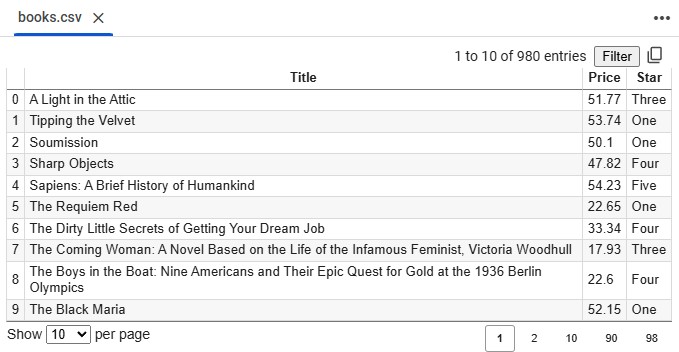
6️⃣ Saving Data to a File
✔ Saves the scraped book data into a CSV file
Web Scraping Code for Quotes – Explanation
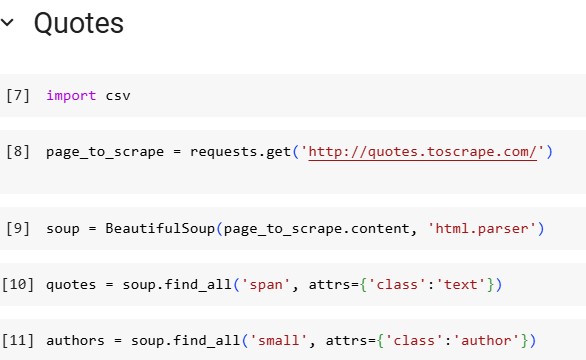
🔹 Import CSV Module
import csv → Used for saving scraped data into a file.
🔹 Fetch Website Content
requests.get('http://quotes.toscrape.com/') → Sends an HTTP request to retrieve page content.
🔹 Parse HTML
BeautifulSoup(page_to_scrape.content, 'html.parser') → Converts raw HTML into a structured format.
🔹 Extract Quotes
soup.find_all('span', attrs={'class': 'text'}) → Finds all quotes on the page.
🔹 Extract Authors
soup.find_all('small', attrs={'class': 'author'}) → Finds all authors associated with the quotes.
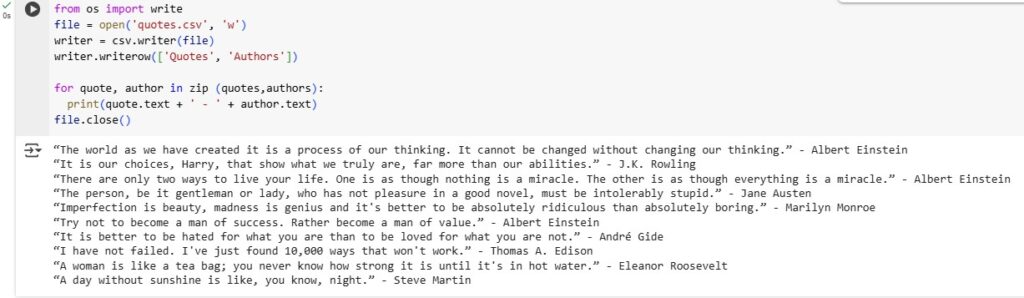
🔹 Import & File Handling
file = open('quotes.csv', 'w') → Opens a CSV file for writing.
writer = csv.writer(file) → Creates a CSV writer object.
writer.writerow(['Quotes', 'Authors']) → Writes the header row with column names Quotes and Authors.
🔹 Loop to Extract & Print Data
for quote, author in zip(quotes, authors): → Iterates through extracted quotes and authors.
print(quote.text + ' - ' + author.text) → Prints each quote with its author.
file.close() → Closes the file to save the content.
🔹 Final Output
Saves extracted quotes and author names into a quotes.csv file.
Outputs quotes in the console for quick review.
Allows further text analysis, sentiment analysis, or dataset usage.
Code, Queries & Documentation
🔗 Find the complete code, query logic, and documentation on my GitHub: